
Immersive English lessons, workshops and activities
Deadline: Not announced yet · From £2,995 · 8-12 · Oxford · In-person
by iD Tech
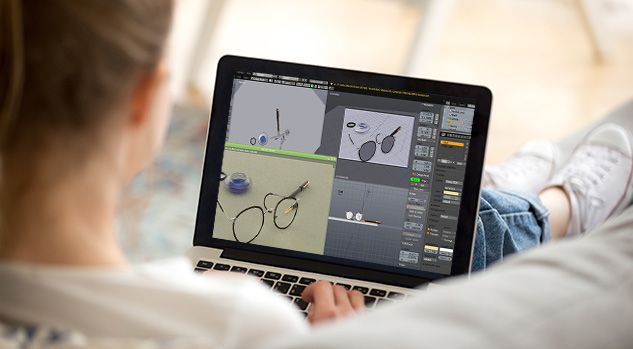
Over five weekdays, students aged 10 to 12 learn to build 3D objects and characters in Blender, the modeling and animation software that iD Tech notes was used by the makers of the Oscar-winning film Flow. The camp runs online in small groups, with a two-hour live lesson each day and two more hours of self-paced work on their own projects. The week moves from simple shapes to characters and objects students design themselves, and it ends with an online showcase for families.
Why it's worth it
iD Tech says its virtual camps average five students per instructor. That gives a beginner who gets stuck on Blender's controls a good chance of getting help from the instructor.
What it asks of you
Plan on about 20 hours over the week. Half of that is live at a set time, while the project hours can fit anywhere in the day. It's a lot of screen time for a 10-year-old, so it suits a child who already enjoys long stretches at the computer.
Who should skip it
Students who already know their way around Blender's modeling tools, because the first days go to basic shapes, navigation, extrusions and loop cuts before any free design. The camp is also listed only for ages 10 to 12, so students 13 or older should look elsewhere.
The week climbs from basic shapes to models you invent yourself. iD Tech's sample week looks like this, though it notes that students progress at different paces, so a given day may cover more or less.
Monday
Blender basics, including creating simple shapes, moving around in 3D space and using the core modeling tools to make a basic character such as a snowman.
Tuesday
More advanced tools, such as loop cuts, extrusions and insets, which you use to design a room.
Wednesday
Sculpting and further modeling tools to build characters from your imagination, like animals or toys.
Thursday
Final project time, either refining models from earlier in the week or starting something new.
Friday
An online family showcase where you present every model you made during the week.
The live part is a two-hour Zoom lesson each weekday, where an instructor teaches the day's techniques and students work alongside each other. The other two hours of project work can happen at any time of day, guided by iD Tech's course materials. Sessions run in several time zones, so you can pick a live slot that fits around the rest of your day.
Getting set up takes a little planning. iD Tech emails instructions for installing the course software and Zoom 10 days before the session, or straight away if you register later, and sends the Zoom link by noon Pacific Time on the Sunday before. You'll need a Mac or Windows computer with a webcam and a stable internet connection. Chromebooks won't work unless iD Tech says otherwise.
Lessons are led by adult instructors based in the US. iD Tech says it recruits them from universities such as Stanford, Caltech and NYU, runs background and reference checks, trains them itself and follows American Camp Association accredited guidelines.
iD Tech doesn't say who teaches this course, and the example it gives of a lead instructor is a software engineering undergraduate at Caltech, so your instructor could be a college student. The instructor profiles it shows, including engineers now at Google and Disney, describe where past instructors went after teaching at iD Tech rather than who teaches now.
You leave with the models you built during the week and an official iD Tech transcript listing the skills you covered. The transcript is iD Tech's own record of the course, not school credit or a qualification.
The camp also earns 625 XP on the iD Tech Pathway, the company's in-house level system. Level 2 takes 1,000 XP, so this camp alone won't lift a student past Level 1. Level 10, which brings rewards such as a letter of recommendation from iD Tech's CEO, needs 21,000 XP, or roughly 34 camps of this size, and iD Tech's own Review Board decides who reaches it.
The camp starts at $399 for the week, and iD Tech shows prices alongside its session dates, so check what your chosen week costs before you book.
iD Tech's terms for this course allow unlimited free changes up to 28 days before your session, with a full refund if you cancel before 1 March 2027. After that, canceling 28 or more days before your session gets you a refund minus a $250 charge per week and any additional fees. Within 28 days of the start, changes carry a fee and there's no refund at all.
iD Tech also describes its policy in other ways, saying both that tuition is non-refundable from the moment you register and that cancellations are free up to 72 hours before camp. These versions don't agree, so confirm with iD Tech which terms apply to your booking before you pay.
Underserved students can apply for iD Tech's tuition assistance, which covers 2027 Virtual Tech Camps for ages 7 to 19. Applications close at noon Pacific Time on 1 July 2027, but awards go out on a rolling basis from March, so it makes sense to apply early. Applying doesn't guarantee a scholarship.
Immersive English lessons, workshops and activities
Deadline: Not announced yet · From £2,995 · 8-12 · Oxford · In-person
Summer study centered on art and design
Deadline: Not announced yet · From £7,900 · 13-18 · St Andrews · In-person
Branding and design study for high school students
21 Feb 2027 · From $2,998 · 14-18 · San Luis Obispo · In-person
Save this program in Succeed to compare it with similar programs, dates, costs and formats in one place.
Compare with other programsidtech.com · Official page
idtech.com
idtech.com
idtech.com
idtech.com
idtech.com
media.idtech.com
Facts checked against the official page on 4 Nov 2026
Editor: Ben Stacy
Succeed has no commercial relationship with iD Tech.
Spot an error? Report it